

Introduction
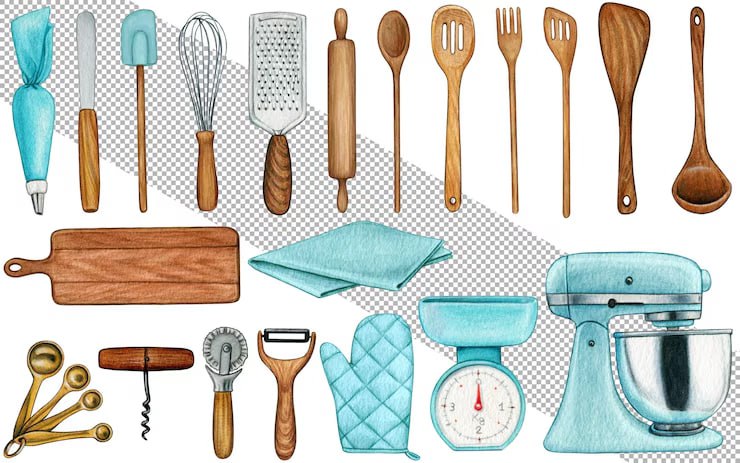
Hand Drawn Kitchen Tools is a Kitchen Illustration Design Resource Template. Hand-drawn illustrations add a creative, friendly, and natural appearance to food, cooking, restaurant, and kitchen-related designs. The Hand Drawn Kitchen Tools collection features artistic kitchen utensil illustrations that can be used to create attractive menus, recipe cards, packaging, posters, social media graphics, and other culinary-themed projects.
Whether you’re designing content for a restaurant, café, cooking blog, food business, kitchenware brand, or recipe publication, these hand-drawn illustrations provide a flexible way to add personality and visual interest to your designs. In this guide, you’ll learn about the features of the resource, how to customize it, and the best ways to use it in your creative projects.
What are Hand Drawn Kitchen Tools?
Hand Drawn Kitchen Tools are illustrated kitchen utensils and cooking-related objects created in a hand-drawn artistic style. Unlike standard digital icons, hand-drawn illustrations can give a design a more personal, organic, and creative appearance.
The collection may include illustrations of:
- Spoons and forks
- Knives
- Spatulas
- Whisks
- Cooking utensils
- Plates and bowls
- Kitchen accessories
- Other cooking-related objects
The individual illustrations can be combined, rearranged, resized, or incorporated into larger compositions depending on the available file format.
Benefits of Using Hand Drawn Kitchen Tools
Using professionally prepared kitchen illustrations offers several advantages:
- Adds a creative hand-drawn appearance
- Saves time when creating food-related graphics
- Provides multiple kitchen-themed visual elements
- Easy to combine with typography and other graphics
- Suitable for digital and print projects
- Useful for restaurant and food branding
- Helps create a friendly and approachable visual style
Hand-drawn elements can work especially well for businesses that want their branding to feel warm, handmade, creative, or informal.
What’s Included in the Download?
Your download may include:
- Editable files (AI/EPS Format)
- High-resolution kitchen illustrations
- Fully editable vector elements
- Individual kitchen tool illustrations
- Transparent PNG files (if included)
- Ready-to-use decorative elements
- Free font information (if applicable)
How to Customize the Kitchen Illustrations
You can edit the vector artwork using Adobe Illustrator.
Step 1:
Download the Hand Drawn Kitchen Tools resource using the link below.
Step 2:
Extract the ZIP file to your preferred directory.
Step 3:
Open the editable vector file in Adobe Illustrator.
Step 4:
Select the kitchen illustrations you want to use in your project.
Step 5:
Customize the artwork according to your requirements:
- Change colors
- Resize illustrations
- Adjust individual elements
- Reposition objects
- Combine different kitchen tools
- Add your own graphics
Step 6:
Add your own content:
- Restaurant name
- Recipe title
- Menu information
- Promotional message
- Website address
- Contact details
Step 7:
Arrange the illustrations and typography into a balanced composition.
Step 8:
Export the completed design as a high-quality PNG, JPG, PDF, or SVG according to your intended use.
Best Use Cases
This Hand Drawn Kitchen Tools resource is ideal for:
- Restaurant branding
- Café designs
- Cooking blogs
- Recipe cards
- Food packaging
- Restaurant menus
- Kitchenware branding
- Cooking classes
- Food social media posts
- Bakery and food businesses
- Posters and flyers
- Culinary websites
The illustrations can also be used as decorative elements around headings, borders, product descriptions, and other food-related content.
Professional Design Tips
For the best results when using hand-drawn kitchen illustrations:
- Keep the illustration style consistent throughout your design.
- Use a limited color palette.
- Avoid overcrowding the layout with too many objects.
- Combine illustrations with readable typography.
- Leave enough empty space around important information.
- Use high-resolution artwork for printed materials.
- Match the illustration style with your overall brand identity.
Create a Consistent Visual Style
If you’re using several kitchen illustrations together, maintain consistent sizing, spacing, and color treatment. This helps the individual elements look like part of one cohesive design.
Use Illustrations to Support Your Content
Kitchen illustrations should complement the main message rather than distract from it. For example, a small whisk or spoon illustration can be used around a recipe title without taking attention away from the recipe itself.
Download Hand Drawn Kitchen Tools
Click the Download button below to get this Hand Drawn Kitchen Tools resource and create creative designs for restaurants, cafés, cooking blogs, recipe cards, menus, food packaging, kitchenware brands, and other culinary projects.