

Introduction
Box Packaging Template is a Packaging Design Resource Template. Professional packaging plays an important role in how customers perceive a product, and a well-designed box can help businesses present their products in an attractive and organized way. The Box Packaging Template provides a practical starting point for creating custom packaging designs for products, brands, retail businesses, and promotional items.
Whether you’re designing packaging for cosmetics, food products, gifts, electronics, stationery, or other retail items, this template can help you visualize and prepare a professional box design. In this guide, you’ll learn about the features of the template, how to customize it, and the best ways to use it in packaging design projects.
What is Box Packaging Template?
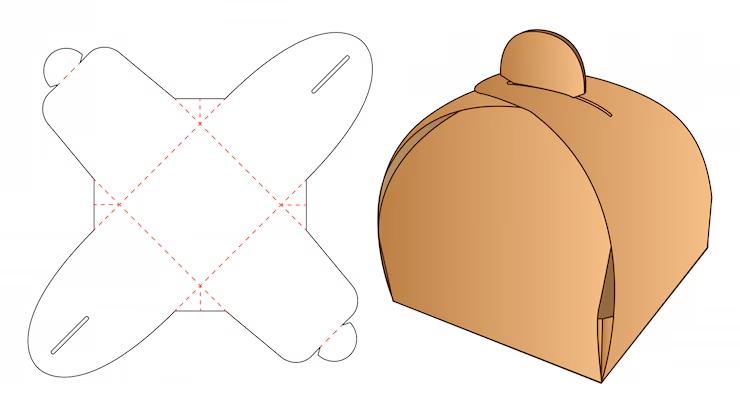
A Box Packaging Template is a ready-made packaging design resource that provides the basic structure and layout needed to create artwork for a box. Depending on the template, it may contain panels, folds, cutting lines, bleed areas, and other elements required for preparing packaging artwork.
A typical box packaging template may include:
- Box dieline or structural layout
- Front, back, top, and side panels
- Fold and cutting guides
- Bleed and safe-area guides
- Editable vector elements
- Space for logos and product information
- Print-ready design structure
These features help designers organize artwork before sending packaging files for professional printing.
Benefits of Using Box Packaging Template
Using a professionally prepared packaging template offers several advantages:
- Saves time during packaging design
- Provides an organized box layout
- Helps position artwork on different panels
- Makes branding easier to maintain
- Suitable for product and retail packaging
- Useful for client presentations and prototypes
- Can be customized for different products
A properly prepared template can also help reduce design errors by providing a clear structure for the different areas of the box.
What’s Included in the Download?
Your download may include:
- Editable files (EPS Format)
- Box packaging dieline
- High-resolution design elements
- Fully editable vector artwork
- Print-ready layout
- Cutting and folding guides
How to Customize the Template?
You can edit the vector template using Adobe Illustrator.
Step 1:
Download the Box Packaging Template using the link below.
Step 2:
Extract the ZIP file to your preferred directory.
Step 3:
Open the editable template in Adobe Illustrator.
Step 4:
Review the dieline and identify the different panels of the box.
Step 5:
Replace the sample content with your own:
- Company logo
- Product name
- Product description
- Product information
- Website address
- Contact details
- Barcode or other required information
Step 6:
Customize the visual design:
- Change colors to match your brand
- Add product photographs
- Edit typography
- Add illustrations or patterns
- Adjust graphic elements
Step 7:
Make sure important text and graphics remain inside the appropriate safe areas and that artwork extends into the required bleed area where applicable.
Step 8:
Review the complete layout before exporting the final artwork.
Step 9:
Export the finished design in the format required by your printing company.
Best Use Cases
This Box Packaging Template is ideal for:
- Product packaging
- Food packaging
- Cosmetic packaging
- Gift boxes
- Retail products
- Electronic accessories
- Stationery products
- Small business packaging
- Promotional products
- Brand identity projects
- Product presentation mockups
A customizable box template can help both designers and businesses develop packaging concepts before moving to physical production.
Professional Packaging Design Tips
For the best results when using a box packaging template:
- Use high-resolution images and graphics.
- Keep important information away from fold and cutting lines.
- Follow the printer’s bleed and safe-area requirements.
- Maintain consistent brand colors throughout the packaging.
- Make the product name easy to identify.
- Use readable typography for product information.
- Check every panel before exporting the final file.
- Print a test or prototype when possible before placing a large production order.
Check the Dieline Carefully
A packaging dieline determines where the box will be cut and folded. Do not accidentally move or delete structural guides unless you understand how the template is constructed.
Consider the Finished Product
Remember that the packaging artwork will eventually be folded into a physical box. A design that looks correct when flat may appear differently once assembled, so reviewing a physical prototype can be helpful.
Download Box Packaging Template
Click the Download button below to get this editable Box Packaging Template and create professional packaging designs for products, brands, retail businesses, and promotional projects.