

Introduction
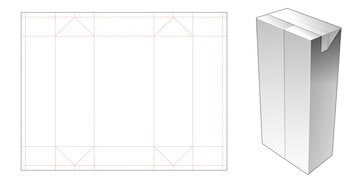
Folding Box Die Cut Template is a Packaging Design Resource. A properly prepared packaging dieline provides a structured foundation for creating folding boxes and preparing artwork for professional printing and production. The Folding Box Die Cut Template provides a ready-made layout that can help designers position graphics, text, branding elements, and product information across the different panels of a folding box.
Whether you’re designing packaging for cosmetics, food products, retail items, gifts, stationery, electronics, or other consumer products, this template can help simplify the packaging design process. In this guide, you’ll learn about the features of the template, how to customize it, and the best practices for preparing your final packaging artwork.
What is Folding Box Die Cut Template?
A Folding Box Die Cut Template is a ready-made packaging structure that shows the areas where a folding box may be cut, folded, and assembled. The dieline helps designers understand how the flat artwork will be transformed into a physical package.
A typical folding box die cut template may include:
- Die cut lines
- Folding or crease lines
- Box panels
- Glue or joining areas
- Bleed areas
- Safe areas
- Front and back panels
- Side panels
- Top and bottom flaps
- Editable vector elements
These structural guides help designers position artwork correctly before sending the packaging file for production.
Benefits of Using Folding Box Die Cut Template
Using a professionally prepared dieline offers several advantages:
- Saves time when creating packaging layouts
- Provides an organized box structure
- Helps position artwork across different panels
- Makes branding easier to apply consistently
- Reduces the need to create a dieline from scratch
- Useful for product packaging concepts
- Suitable for professional print preparation
A clear dieline also helps designers understand which areas will become the front, back, sides, flaps, and other parts of the assembled box.
What’s Included in the Download?
Your download may include:
- Editable files (EPS Format)
- Folding box dieline
- Die cut and fold guides
- Bleed and safe-area guides
- Fully editable vector elements
- Packaging panel layout
- Print-ready structural artwork
How to Customize the Folding Box Template
You can edit the vector template using Adobe Illustrator.
Step 1:
Download the Folding Box Die Cut Template using the link below.
Step 2:
Extract the ZIP file to your preferred directory.
Step 3:
Open the editable dieline file in Adobe Illustrator.
Step 4:
Review the template carefully and identify the different panels, fold lines, cut lines, and glue areas.
Step 5:
Add your own packaging content:
- Company logo
- Product name
- Product description
- Product photographs
- Brand information
- Product specifications
- Barcode
- Website address
- Contact information
Step 6:
Customize the visual appearance:
- Change colors
- Add patterns
- Edit typography
- Insert illustrations
- Add product photography
- Apply your brand identity
Step 7:
Keep important text, logos, and other essential artwork inside the appropriate safe areas. Extend background artwork into the required bleed area where applicable.
Step 8:
Review all panels and make sure the artwork follows the correct orientation when the box is folded and assembled.
Step 9:
Export the completed packaging artwork according to your printing company’s specifications.
Best Use Cases
This Folding Box Die Cut Template is ideal for:
- Cosmetic packaging
- Food packaging
- Retail product boxes
- Gift boxes
- Pharmaceutical packaging concepts
- Electronic accessory packaging
- Stationery packaging
- Small business products
- Promotional packaging
- Product branding projects
- Packaging design presentations
- Print production projects
It can be adapted for different product categories depending on the dimensions and structure of the supplied dieline.
Professional Packaging Design Tips
For the best results when using a folding box dieline:
- Keep important content away from cut and fold lines.
- Follow the template’s dimensions carefully.
- Use high-resolution images and graphics.
- Maintain consistent branding across all panels.
- Check the orientation of every panel before printing.
- Follow your printer’s bleed and color requirements.
- Keep glue areas free from important artwork when required.
- Create a physical proof or prototype before large-scale production when possible.
Understand Cut and Fold Lines
Cut lines indicate where the packaging material will be trimmed, while fold or crease lines indicate where the box will be folded. These structural guides should be preserved according to the printer’s requirements.
Check the Assembled Box
A flat dieline can look correct while still producing unexpected results when folded. If possible, create a test print and assemble the box to verify panel orientation, artwork placement, and overall appearance.
Follow Printer Specifications
Different printing and packaging companies may have specific requirements for bleed, color mode, line weights, file format, and dieline conventions. Confirm these requirements before submitting the final artwork.
Download Folding Box Die Cut Template
Click the Download button below to get this editable Folding Box Die Cut Template and create professional packaging designs for retail products, cosmetics, food items, gifts, stationery, electronics, and other packaged goods.